Baby Connect: Newborn Tracker
- 4.5
- Rating
- 100.00K
- Installs
- Free
- Price

 Analysis by App-foxy
When caring for a newborn, the difficult part is often not knowing what happened but remembering it at the right moment. A feeding may have happened while I was half awake, a diaper change may have been handled by someone else, and a short nap can easily disappear from memory during a busy day. Baby Connect: Newborn Tracker is designed around that exact problem: keeping everyday baby-care information in one shared place instead of relying on scraps of paper, memory, or scattered phone notes.
I reviewed it as a parenting app from Seacloud Software, and my overall impression is that it is most useful when several people share responsibility for the same baby. It brings together feeding, sleep, diapers, growth, milestones, and related notes in a format intended for repeated daily use. The app is free to start, rated for Everyone, and its current version is 10.43. It has built a substantial user base, with over one hundred thousand installs, an average rating of 4.5, and around eleven thousand ratings.
The strongest reason to use it is continuity: the next caregiver can see what happened without interrupting the previous caregiver for a complete verbal handover. That sounds simple, but during the first months it can reduce a surprising amount of mental effort. The experience is not perfect, and families who want an extremely minimal tracker may find it busier than necessary. Still, for parents, relatives, babysitters, or other caregivers who need a detailed shared record, it has a practical purpose beyond simply counting events.
You May Also Like

 Blood Strike: 2.5 Anniversary
Blood Strike’s Loadouts Turn Every Drop Into a Tactical Gamble
A close look at Blood Strike’s custom loadouts: how fast access to signature weapons reshapes its battle royale rhythm, rewards preparation, and narrows the gap between fights.

 Pandora - Music & Podcasts
Pandora’s Music Is Easy to Start, but Harder to Recover
Pandora’s strength is its low-effort path from a seed to a station. Its weak spot is how much confidence it asks you to place in connection, setup, and quiet recovery.

 8 Ball Pool
 Is Built on Rivalries, Rematches, and Routine
A close look at the rivalries, rematches, shared routines, and unanswered safety questions that turn a quick pool match into a persistent mobile community.

 Samsung Music
’s Quiet Strength Is Playing What You Already Own
Its reach comes less from spectacle than from dependable access to a personal library. That simplicity is both the app’s strongest retention engine and its ceiling.

 AccuWeather: Weather Radar
AccuWeather Review: A Quick, Clear Forecast for Everyday Decisions
For everyday plans, the best forecast is the one you can understand quickly. AccuWeather makes rain timing, radar, and local conditions easy to act on, with a few trade-offs.

 Hill Climb Racing
Why Hill Climb Racing Still Turns Crashes Into One More Run
A tiny car, a bumpy hill and one more upgrade: Hill Climb Racing keeps resurfacing because its simple chaos makes every near-miss feel personal.
More From Our News Desk



Readability and navigation during tired, interrupted days
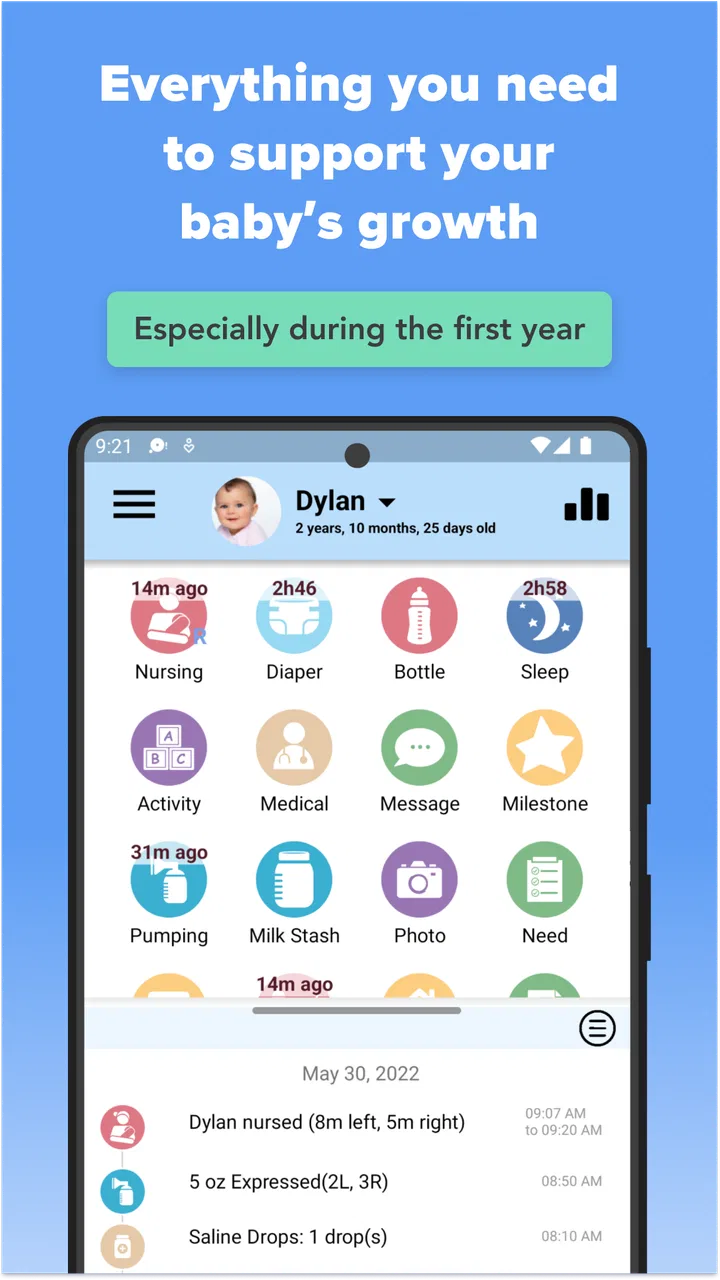
The value of a baby tracker depends heavily on how quickly I can find the action I need. A useful log should not make me think through a complicated sequence while holding a baby, preparing a bottle, or trying to record something before the next interruption. Baby Connect is organized around familiar care categories, so the basic mental model is easy to understand: choose the type of event, record it, and return later to review the pattern.
That familiarity helps people who are new to tracking. I do not need to translate a technical dashboard into parenting language. Feeding, sleep, diaper activity, growth, and milestones are recognizable areas, and the arrangement makes more sense than a general-purpose notes app where every entry looks the same. The distinction matters when I am checking whether a change is part of a broader routine or just an isolated event.
For readability, the app benefits from presenting information as a record rather than forcing every detail into a long written note. A time-based history is easier to scan than several pages of free text. It also gives different caregivers a common vocabulary. One person may describe a feeding in a particular way, while another might use different words in a message; structured entries reduce that ambiguity.
There is a trade-off, however. A tracker that covers many parts of infant care naturally has more choices than a single-purpose sleep timer. New users may need a little time to decide which details are worth recording and which can be left alone. I would not recommend trying to document every tiny event immediately. A better approach is to begin with the information your household actually needs, then add detail only when it helps you make a decision or communicate with another caregiver.
One useful workflow is to treat the app as a handover tool rather than a diary. Before a partner takes over, I can use the recent history to answer practical questions: when the last feeding happened, whether the baby slept recently, and what still needs attention. This prevents the common situation where both adults assume the other person handled something. It also makes the record more useful than a collection of isolated timestamps.
The growth and milestone areas serve a different purpose from the daily log. Daily entries help with immediate coordination, while growth and milestone records create a longer view. Keeping those functions in the same parenting app means I do not have to reconstruct a developmental timeline from old messages and photographs. I would still treat the record as a personal organizational aid, not as a substitute for professional medical advice.
How the structure helps different readers
Families do not all process information in the same way. Some people prefer a chronological history, while others want a quick view of the latest activity. A structured tracker can support both habits better than an ordinary notebook, because the same information can be revisited as an event history instead of being buried in prose. That is especially helpful when one caregiver is returning after several hours away.
People with limited reading stamina may appreciate being able to focus on the category that matters at that moment instead of reading a full narrative. Someone who is stressed or sleep deprived can work from a small, familiar set of actions. I found that this kind of predictable organization is more important than decorative design in a newborn app.
At the same time, visual clarity is not only about having separate sections. The amount of information presented can become tiring if I record too much detail without a clear purpose. My advice is to keep the routine concise: use the core event categories for everyday tracking, and reserve notes for exceptions, questions, or context that another caregiver genuinely needs to know.
Motor, sensory, and situational access in real caregiving
Newborn care is rarely performed under ideal conditions. I may be using the app one-handed, with a baby in the other arm, while standing in a dim room or moving between tasks. That makes motor access a practical concern even for people who do not identify as having a disability. The fewer precise interactions required, the more usable the tracker feels during real life.
Baby Connect is well suited to the idea of quick event logging, but detailed tracking can still require attention and accurate input. If I am recording several pieces of information for one event, the process may feel slower than simply writing “fed” in a note. That is the main trade-off between a structured record and a minimal one. The structure gives better information later, but it asks for more effort at the moment of entry.
For users with limited dexterity, hand tremors, joint pain, or fatigue, the best strategy is to agree on a small recording routine with the household. Record only the fields that affect care decisions, and let another caregiver add secondary details when needed. This avoids turning the app into an obligation that competes with the care itself.
People with low vision or light sensitivity should judge the interface on their own device and preferred display settings before committing to a detailed tracking habit. I would not assume that every visual element will work equally well for every reader. The app’s category-based organization can help with orientation, but users who depend on specific contrast, text-size, screen-reader, or magnification behavior should test those interactions directly rather than relying on the general age rating.
For users with hearing differences, the core value is not dependent on listening to spoken information. The record itself can support communication between caregivers who are not in the same room. A partner can check the latest entries instead of waiting for a verbal update, and a caregiver who cannot hear a baby-related conversation clearly can still work from the written record. That does not solve every communication need, but it reduces dependence on spoken handovers.
Sensory load is another consideration. Parenting apps can become overwhelming when every possible event is treated as equally important. I found the most comfortable approach is to make the app serve a short list of household priorities. If sleep is the immediate concern, focus on sleep entries. If feeding coordination is the issue, keep the attention there. The broader categories remain available without requiring me to engage with all of them at once.
A realistic shared-care scenario
Imagine a parent finishing an overnight shift while a partner begins the morning. Instead of explaining the entire night from memory, the departing caregiver can leave a record of feedings, sleep periods, and diaper changes. The incoming caregiver can review that sequence while preparing breakfast, then continue the same record. Later, a relative helping for a few hours can understand the recent routine without asking the exhausted parent to repeat it.
This scenario shows why the app is more than a private notebook. Its usefulness grows when the baby has multiple caregivers and the household needs a consistent account of what has already happened. It is less compelling if only one person wants to record occasional notes and everyone else prefers informal conversation.
Another practical use is preparing for a discussion with a pediatric professional. A parent can review the recent pattern and describe it more accurately than they might from memory. The app does not interpret the information for me in a way that replaces clinical judgment; its contribution is helping me arrive with a clearer personal record and better questions.
What it handles well, and where the effort remains
The broad coverage is the app’s clearest strength. Many parents begin with feeding or sleep and later realize they also want a growth record, milestone notes, or a consistent diaper history. Having those areas together avoids the fragmentation that happens when one app is used for sleep, a spreadsheet for growth, and messages for caregiver updates.
Compared with a paper notebook, the app is easier to search mentally through by category and more practical when several people need the same information. Paper can be wonderfully fast and forgiving, but it can be misplaced, become hard to read, or remain in one room. Compared with a basic notes app, the dedicated structure reduces the need to invent a format. The downside is that a notebook or notes app may feel faster for families who only need a few free-form reminders.
Compared with a narrowly focused sleep or feeding tracker, Baby Connect offers a wider picture of daily care. That breadth is useful when the family wants one ongoing record, but it also means the experience may feel less streamlined than an app built around one measurement. If your only goal is a simple timer, choosing a specialized tool may be more comfortable. If your goal is coordination across several care areas, the wider structure makes more sense.
The free starting price lowers the barrier to trying it, but the app also includes in-app purchases ranging from $4.99 to $119.99 per item. I would approach those purchases carefully. Before paying for anything, I would first establish whether the free experience fits the household’s recording habits and whether every intended caregiver can use the workflow comfortably. A detailed tracker is only worth ongoing spending if it genuinely reduces confusion rather than adding another task.
The app’s long presence in the category can be reassuring to people who prefer an established product, and its release history goes back to August 25, 2011. Still, longevity does not automatically mean the interface will match every modern expectation. Users who prioritize the newest visual style, a very sparse screen, or a particular accessibility interaction should spend time testing the current version rather than choosing solely from its age or popularity.
There is also a psychological barrier that is easy to overlook: tracking can become stressful. Some parents feel pressure to record everything perfectly, then interpret an incomplete log as a failure. I strongly recommend treating the record as a support tool, not a performance score. Missing an entry does not make the day invalid. The app is most helpful when it answers a specific question or improves a handover.
Privacy and household boundaries deserve thought too, even without making assumptions about technical policies. Decide who actually needs access to the baby’s routine and what level of detail each person should receive. A shared record can improve coordination, but it can also create tension if every entry becomes a subject for criticism. Agreeing on the purpose of the log before inviting others is a small step that can make the experience much healthier.
Who should use it and who may prefer something else
I would recommend it to parents who want a detailed, continuing record across feeding, sleep, diapers, growth, and milestones. It is particularly suitable for households with two or more regular caregivers, parents returning to work, families receiving frequent help, or anyone who needs to communicate a baby’s recent routine without relying on memory.
It can also suit caregivers who value patterns over isolated reminders. Looking back at a series of entries may help a parent notice when a routine changed and prepare more precise questions for a professional. The important point is that the app organizes observations; it should not encourage a parent to diagnose a health concern from a log alone.
I would suggest skipping it if you know you will resent structured entry, if you only want one occasional reminder, or if a paper notebook already works smoothly for everyone involved. It may also be the wrong choice for someone who needs a very specific accessibility behavior that has not been personally tested. In that case, a simpler tool with a more familiar interface could be better, even if it records less.
Families with different languages, literacy levels, or communication styles should decide together what the entries need to convey. The app can provide a shared structure, but it cannot remove the need for clear household agreements. A short, consistent routine is more inclusive than asking one caregiver to maintain a highly detailed record that others cannot comfortably interpret or update.
Inclusive verdict for everyday parenting
Baby Connect: Newborn Tracker is a practical parenting app with its best results coming from shared, repeat use. It gives caregivers a central record for daily events and longer-term observations, which is more useful than a generic note when the household needs continuity. The category-based approach can support tired readers, people who prefer structured information, and caregivers who cannot depend on spoken handovers.
Its limitations are equally clear. More coverage means more decisions, and detailed logging can be demanding when motor control, vision, fatigue, sensory load, or time pressure make phone interaction difficult. The free entry point is helpful, but the range of in-app purchase prices means I would test the routine before spending. I would also avoid treating the app as a medical authority or as a requirement to document every moment.
My recommendation is to begin with a deliberately small setup: choose the few event types your household needs most, use them consistently for several days, and see whether the record makes handovers easier. If it reduces repeated questions and helps you describe routines clearly, expand into growth and milestones. If it feels like administrative work with little benefit, a simpler notebook or notes tool may serve you better.
For me, the decisive question is not whether the app can record many aspects of newborn care. It is whether those records make the people around the baby more coordinated and less mentally overloaded. For families that answer yes, Seacloud Software’s app is a capable option, with a broad scope and a sensible role in everyday care. I would choose it for shared visibility, not for perfect tracking.
FAQs for Baby Connect: Newborn Tracker
01What is Baby Connect: Newborn Tracker used for?
Baby Connect: Newborn Tracker is designed to help parents and caregivers record and organize daily information about a baby’s routine. You can track feeding, nursing, bottles, sleep, diaper changes, pumping, medication, growth, mood, and other activities. Having these details in one place can make it easier to identify patterns, share updates with family members, and provide useful information during pediatrician visits.
02Can multiple caregivers use the same Baby Connect account?
Yes, Baby Connect is built for shared caregiving. Parents, relatives, babysitters, and other authorized caregivers can generally access the same child’s information from their own devices after being connected to the account. This makes it practical for households where several people care for the baby. Before relying on shared access, check the current subscription and account requirements for the number of users and supported devices.
03Does Baby Connect: Newborn Tracker work without an internet connection?
The app can usually be used to enter information even when an internet connection is temporarily unavailable, which is helpful when traveling or caring for a baby in areas with weak reception. Data synchronization and sharing between devices may require internet access, however. For important records, allow the app to sync once you are online and keep your account details secure so your information can be restored when needed.
04Is Baby Connect suitable for monitoring a baby’s health and development?
Baby Connect can be useful for recording health-related observations, growth measurements, medications, symptoms, and routine changes, but it is not a medical diagnostic tool. Its charts and logs may help you communicate more clearly with a healthcare professional, especially when discussing feeding, sleep, or medication schedules. Always follow advice from your pediatrician and seek professional care for urgent symptoms instead of relying only on app records.
05Is Baby Connect: Newborn Tracker free to download?
The availability, trial options, and pricing of Baby Connect may differ between Android and iOS and can change over time. The app may offer an initial download or trial while placing certain features behind a subscription or purchase. Before downloading, review the current store listing carefully, including renewal terms, in-app purchases, and cancellation instructions. This is especially important if multiple caregivers or advanced reports are needed.
Pros
- Tracks feeding
- sleep
- diapers
- growth
- and medications in one place.
- Supports multiple caregivers with synchronized data across devices.
- Offers detailed charts and reports to reveal changing routines.
- Customizable timers
- reminders
- and activity categories fit different families.
- Allows notes and photos to add useful context to daily records.
Cons
- Many advanced features require a paid subscription or one-time purchase.
- The large number of tracking options may feel overwhelming at first.
- Caregivers need an internet connection for reliable cross-device syncing.
- Manual data entry can become time-consuming during busy newborn days.
- Its interface feels more practical than modern or visually polished.

Baby Connect: Newborn Tracker
Gallery